Inventory Analysis
Upload your Kroll Min/Max and Last Used reports to generate a full inventory analysis with PDF export.
⏳
Loading analysis engine (first load ~20 s, cached after)…
Step 1 — Download Reports from Kroll
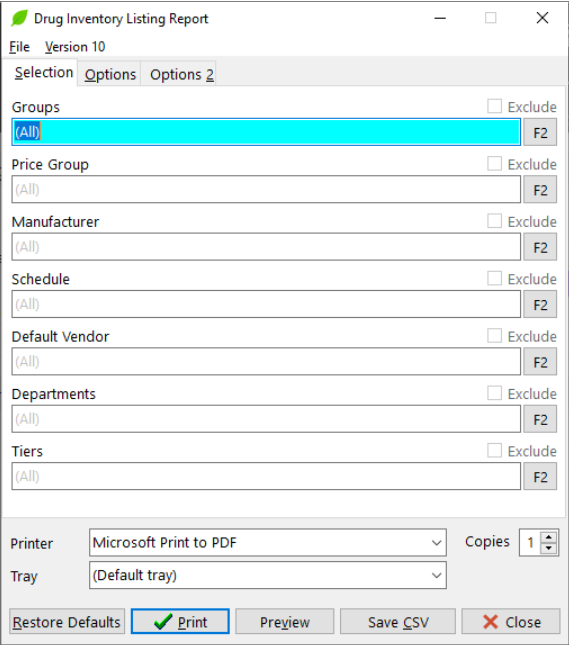
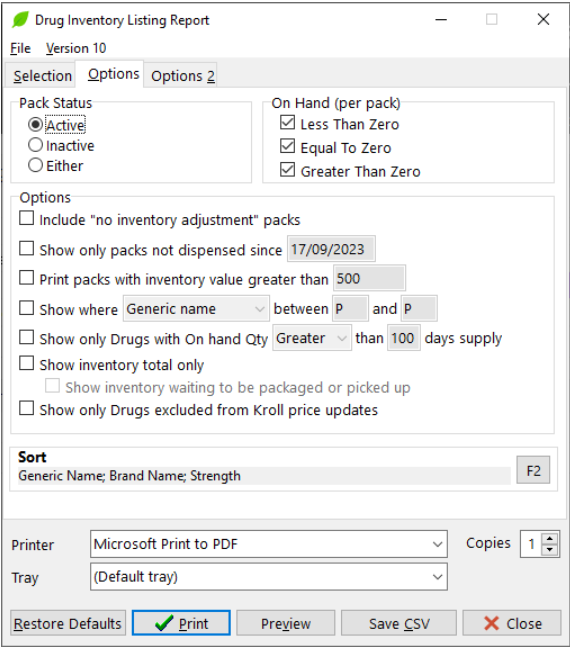
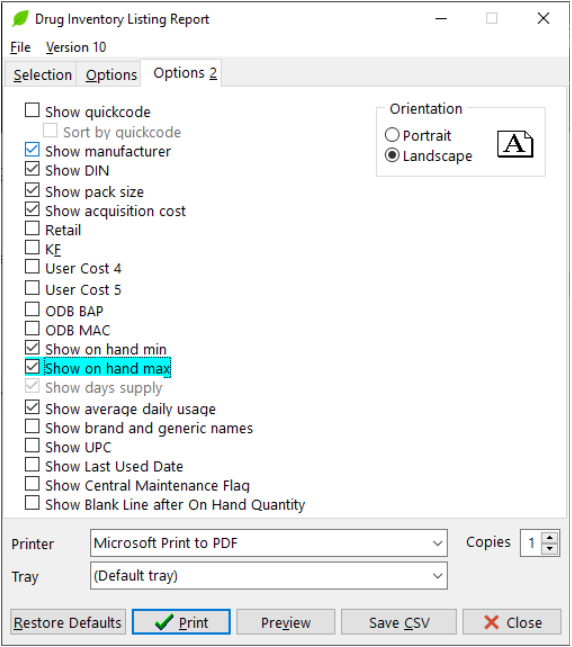
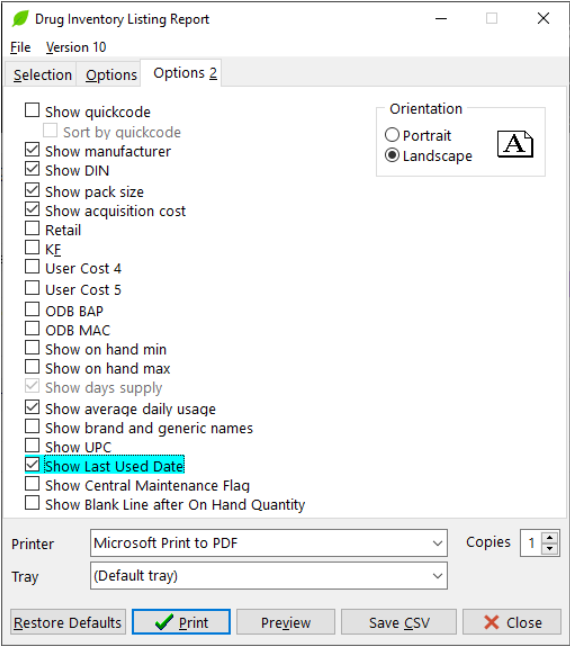
You need two CSV exports from the Drug Inventory Listing Report in Kroll. Use the guide below for exact steps.
Step 2 — Upload CSV Files
Min/Max Report
CSV — includes On Hand Qty, Min, Min Days, On Hand Value
Last Used Report
CSV — includes Last Used Date and Avg. Daily usage
Step 3 — Analysis Settings (optional — defaults shown)
Items not dispensed in this many days
Flag items with On Hand Day Supply above this
Flag items with Min Days setting above this
Flag items with On Hand Value above this
Step 4 — Generate Reports
Runs the full analysis and downloads both an Excel workbook and a landscape PDF to your Downloads folder.
Loading…
Summary
⚠️ Negative Inventory Items — URGENT
0 items
⚠️ Immediate Action Required:
• Investigate negative stock levels immediately
• Verify actual physical counts vs. system counts
• Check for unreported dispensing or waste
• Check Trouble Queue, Rx Verification, and Packaging for Rx in Trouble
• Confirm these are "true" negatives and match to an Rx in progress or item on order
• Adjust inventory records to reflect actual counts
• Investigate negative stock levels immediately
• Verify actual physical counts vs. system counts
• Check for unreported dispensing or waste
• Check Trouble Queue, Rx Verification, and Packaging for Rx in Trouble
• Confirm these are "true" negatives and match to an Rx in progress or item on order
• Adjust inventory records to reflect actual counts
| Run analysis to see results. |
📐 High Minimum Days Settings
0 items
Action Items:
• Review and adjust minimum day settings in your system
• Adjust minimum to achieve a 30-day On Hand supply or less (best practice in most cases)
• For low-Rx items with stock-out risk, set min reorder point to NO HIGHER than Rx Qty Max
• Update reorder parameters based on current usage patterns
• Schedule regular reviews of minimum day settings
• Review and adjust minimum day settings in your system
• Adjust minimum to achieve a 30-day On Hand supply or less (best practice in most cases)
• For low-Rx items with stock-out risk, set min reorder point to NO HIGHER than Rx Qty Max
• Update reorder parameters based on current usage patterns
• Schedule regular reviews of minimum day settings
| Run analysis to see results. |
🕰 Stale Inventory
0 items
Action Items:
• These items are at risk of expiring and are inflating on-hand inventory
• Prioritize items with high On Hand Value (top of list)
• Consider using patient assistance cards to bill/use inventory of brand name items recently off-patent
• Consider returning slow-moving items if possible
• Post online or reach out to other stores for a stock transfer (excluding narcotics/controlled)
• Items may appear here if active Rxs are being filled by Central Fill Pharmacy
• These items are at risk of expiring and are inflating on-hand inventory
• Prioritize items with high On Hand Value (top of list)
• Consider using patient assistance cards to bill/use inventory of brand name items recently off-patent
• Consider returning slow-moving items if possible
• Post online or reach out to other stores for a stock transfer (excluding narcotics/controlled)
• Items may appear here if active Rxs are being filled by Central Fill Pharmacy
| Run analysis to see results. |
💰 High Value Items
0 items
Action Items:
• Monitor high-value items with increased frequency
• Consider just-in-time ordering for expensive items
• Ask patients to set up Autofill; reduce min to zero and order at time of processing the claim
• Attempt a store-to-store transfer for items used at other locations
• Brand name items typically have shorter payment terms — lower On Hand Day Supply improves cash flow
• For generics, longer terms allow a larger On Hand Day Supply
• Monitor high-value items with increased frequency
• Consider just-in-time ordering for expensive items
• Ask patients to set up Autofill; reduce min to zero and order at time of processing the claim
• Attempt a store-to-store transfer for items used at other locations
• Brand name items typically have shorter payment terms — lower On Hand Day Supply improves cash flow
• For generics, longer terms allow a larger On Hand Day Supply
| Run analysis to see results. |
📦 High Days Supply
0 items
Action Items:
• Prioritize action on items with the largest On Hand Days Supply and risk of expiry
• Reduce automatic reorder quantities immediately to prevent unneeded ordering
• Monitor expiration dates more closely
• Attempt store-to-store transfer or post online for items at risk of expiring
• Review items with a low Rx count for Autofill eligibility
• Prioritize action on items with the largest On Hand Days Supply and risk of expiry
• Reduce automatic reorder quantities immediately to prevent unneeded ordering
• Monitor expiration dates more closely
• Attempt store-to-store transfer or post online for items at risk of expiring
• Review items with a low Rx count for Autofill eligibility
| Run analysis to see results. |